July 3rd, 2008

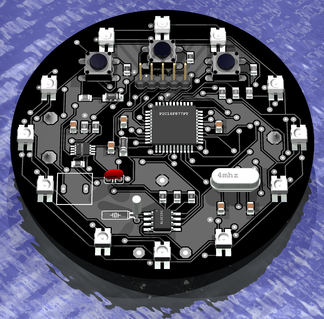
I’m writing this post as a proposal for an umIEEE student workshop project. The project is my LED Pocketwatch, now renamed to become a Desktop Clock. This project is meant as a fun excercise that will give participants some surface mount soldering experience and some knowledge on how a PIC operates and the design process used to create your own projects using EagleCAD to create both home-made etched PCBs and professional quality ordered PCBs.
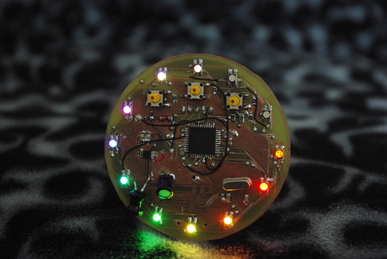
The Image you see above is a 3D rendering of the latest design of the PCB. The rendering is pretty much true to what I expect to build except for a missing inductor and the wrong capacitor in the PSU, which can be seen along with more details in the photo of the prototype after the jump.
Read the rest of this entry »
Share and Enjoy:
These icons link to social bookmarking sites where readers can share and discover new web pages.
Tags: clock, ieee, led, microcontroller, pcb, pic, rgb
Posted in Desktop LED Clock | No Comments »
March 15th, 2007

Ok, first of all, let me make this clear. I am not giving up on the MP3 Player just yet. I’ve decided to work on a simpler project for a while and take a bit of a break from the MP3 player. I’ve had the idea to make this pocketwatch for quite a while, and finally decided to act on it.
Here’s the jist of the project. 12 RGB LEDs in a clock face (originally I wanted 60, but this proved to be technically not feasible) pattern. If you dont know what an RGB LED is, its basically three LEDs in one package that share a common cathode. With this, you can send three PWM signals to each colour and effectively achieve any colour you can come up with (which is practically limited to around 255 colours).
So my plan is basically this, each hand of a clock will be represented by a different colour. As the hands move and overlap, the colours will be added. When a hand is in between numbers, different shades of the colour will be used (for instance, there will be 5 shades that represent the minute hand. At 12:00, the uppermost LED will be lit fully. at 12:01, it will dim a bit and the 1:00 LED will light by the same amount. This progresses until at 12:05 the 12:00 LED is off and the 1:00 LED is on completely).
I have four major goals that I wish to accomplish with this project:
- First and foremost, I want to use this as a chance to design and implement a PCB. I think this PCB may be significantly simpler than my MP3 player, and is a good learning exercise.
- Similarily, I will use this as a chance to practice my surface mount soldering. I swear, I’m getting better. =)
- I want to finally get the damned MAX1675 DC-DC converter working. This thing has been causing me nothing but headaches, and I think I’ve figured out why. The silly inductor that is required to begin the resonation that increases the voltage is hard to come by. I’ve tried (and ordered) several different inductors and coils to test this with, none of which worked. Recently, I saw on a website another person using this device with an inductor that is nothing like the tiny ones I’ve been trying. It was a big obvious looking coil of wire. I’ve ordered some more inductors to play with, and I seriously hope I get this solved soon (for both the pocketwatch and the MP3 player).
- I will use this as a chance to test out a few little tricks and ideas that I’ve picked up here and there, such as testing in circuit serial programming, the behaviour of ground planes on my PCB (hopefully it behaves nicely), i2c devices (such as the real time clock), etc…
Anyway, thats enough ranting for now. I’ll post more on this later, when I’ve got something cool to show. My first step, is to get a prototype working on a breadboard. I’ve rigged up 9 of the LEDs so far in a grid pattern and hope to get the pic multiplexing different colours to them at a reasonable speed with enough power left to do things like calculate hand positions and read the RTC. Unfortunately the PIC only has 2 PWM channels, which means that I’ll have to come up with my own PWM channels and bit bang them (substantially slower, but it should still be adequate).
Share and Enjoy:
These icons link to social bookmarking sites where readers can share and discover new web pages.
Tags: clock, led, pic, pocketwatch, rgb
Posted in Desktop LED Clock | No Comments »
November 8th, 2006
Eagle Schematic (a work in progress)
PCB Layout (a work in progress)
School and work have really been consuming most of my life since September, but this past week or so I’ve found some time to pick up where I left off with the MP3 player.
My FAT16 driver is now working a bit better. I fixed a few annoying bugs and have updated my read method so that I can tell when I’m at the end of a file. I’ve been working on a newer version of the read method that is a bit more useful. Previously, in one method it would read the entire file and output the data directly to the LCD, 32 characters at a time (overwriting the previously read data every sector). This is nifty as a proof of concept but not really too useful.
Instead, I’m working on a new version of the read routine that reads a sector of the file, copies it to a user specified buffer, updates some indecies in the file structure, and then returns the total length of the data returned (which is always 512 bytes until the last chunk). So you call the read method multiple times until you’re at the end of the file. This will let me actually *use* the data instead of immediately throwing it away. I decided to use a second buffer (in addition to the physical layer buffer that stores data straight from the SD card) so that I don’t have to worry about overwriting data with future SD read requests. This isn’t so important now when I’m only doing one thing at a time, but in the final version I may want to be able to browse the SD card while playing an MP3 (for instance).
The MP3 decoder has been interfaced for a while, but I’m having a bit of difficulty configuring it. It requires a special sequence of writes to configure the decoder with details on the clock and other undocumented settings (over 2000 such writes). Right now I’m storing the file in the root directory of the SD card and will open the file, read its contents, and transfer it over to the decoder. Eventually I may just store this configuration data in ROM, but for now it’s a good opportunity to test my FAT driver. Once I’ve got the configuration file sent over, I’ll be able to send the RUN command and hopefully the decoder will start asking for data.
I’ve also been playing around with EAGLE a bit, drawing up my schematic and working on a PCB design. It’s really nowhere near ready yet, but I thought I’d mention it. I’ll post some images of the schematic and PCB layout in the next day or so.
Share and Enjoy:
These icons link to social bookmarking sites where readers can share and discover new web pages.
Posted in Mp3 Player | 3 Comments »